Everything inside
The most complete AI film studio.
Sixteen templates, five video providers, nine editor tabs, an AI director, music, voice and sound design. Here is all of it, in the order you meet it.
7-day trial · 50 tokens · no credit card

AI chat director
Direct a film by talking.
Describe what you want in plain English. The AI writes the script, casts the characters, places the cameras and composes the timeline — all through conversation.
The director
- Interface
- Chat
- Context
- 1M tokens
- Reach
- Up to 99 scenes
- Method
- Tool calls
- Cost
- Included
- Natural language direction
- Describe the vision in plain English and the AI builds it.
- Tool-calling architecture
- The AI edits the production data directly instead of handing back text to copy.
- 1M token context window
- It remembers every detail across all 99 scenes of a production.
- Iterative refinement
- Adjust characters, scenes and style conversationally, one note at a time.
Template wizard
A guided wizard for every template.
Answer a handful of questions and the AI returns a complete production plan — scenes, characters, style and audio — before you write a word of script.
The set
- Templates
- 16
- Categories
- 8
- Steps
- 4
- Cost to try
- Free
- 01Name · category · key feature
Product details
What are you promoting?
- 02Audience · pain point · tone
Target audience
Who is this for?
- 03Style · colours · music
Visual style
How should it look?
- 04Template · scenes · provider
Ready to generate
The production is configured.
CharacterSpecV3
The deepest character system in AI video.
Every character is defined by 30+ locked attributes. Upload a photo or describe one from scratch — the AI extracts the rest and holds it steady for the whole film.
Extraction
- Input
- Photo or text
- Attributes
- 30+
- Groups
- 6
- Reuse
- Across projects
- Face
- Shape · eyes · nose · mouth · eyebrows · facial hair · marks and scars
- Hair
- Color · style · length · part
- Body
- Height · build · posture
- Wardrobe
- Base outfit · color palette · must-have items · must-avoid items
- Voice
- Accent · tone · speaking rate · volume · cadence
- Identity
- Age · species · gender · ethnicity and skin tone
Upload photo → AI extraction → full spec locked
The desk you work at
A director’s chair, not a prompt box.
Cast on the left, storyboard in the middle, the AI director in the chat. Change a character and every shot that uses them updates. Change your mind about scene four and only scene four re-renders.
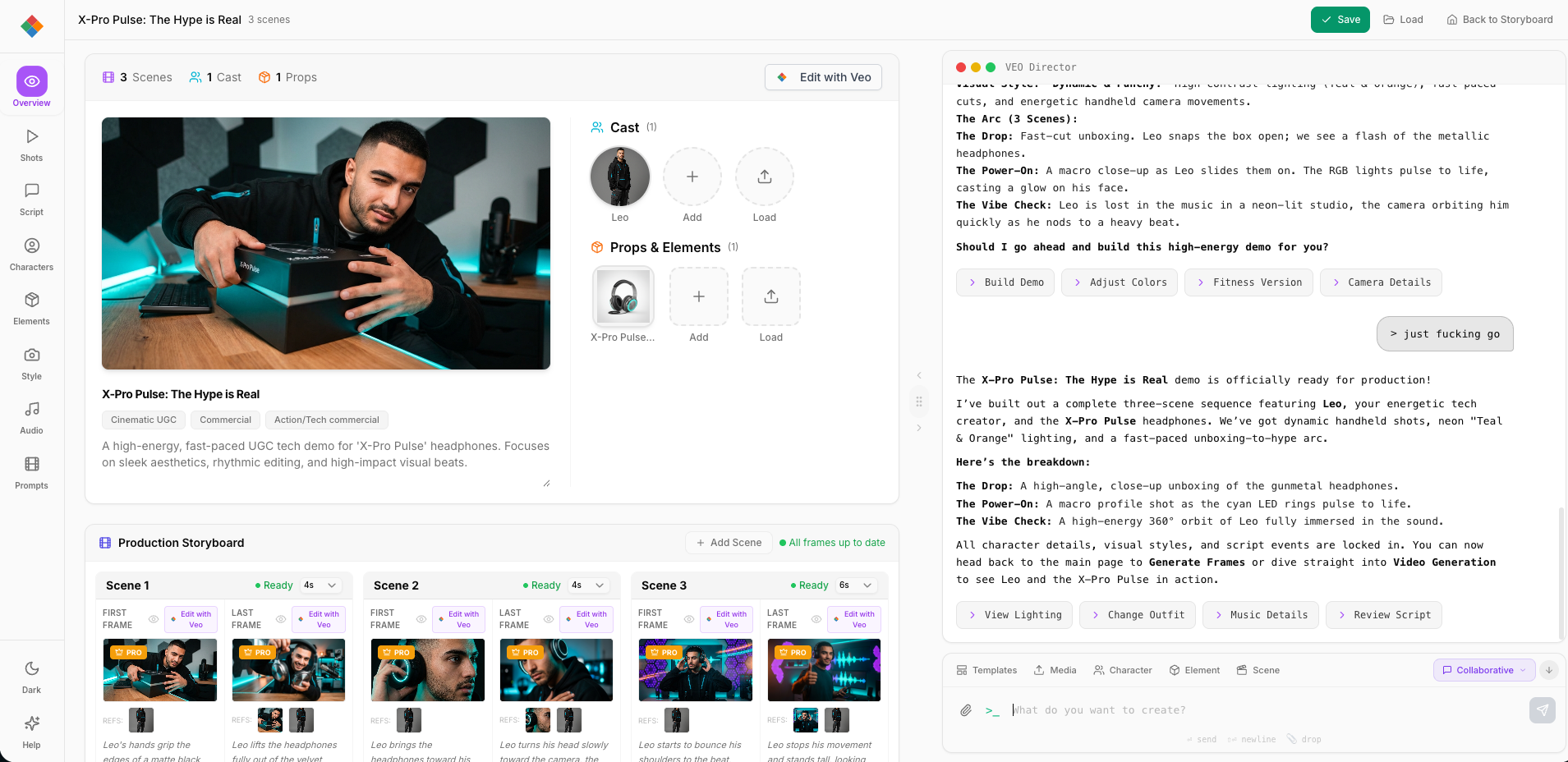
Nine tabs
Every tab, explained.
Project title, logline, description, genre tags and production metadata at a glance.
Summary · genre tags · counts · quick editsScene list with a 7-lane Gantt timeline, storyboard view and scene-level settings.
7-lane Gantt · reorder · per-scene provider · transitionsCharacterSpecV3 profiles with face, hair, body, wardrobe and voice — extracted from photos or AI-generated.
30+ locked attributes · photo extraction · cross-project libraryProps, set pieces and visual elements that hold their look across every scene that uses them.
Prop library · reference images · scene placementGlobal visual identity: color palette, genre, era, film references and lighting direction.
Palette builder · genre and era presets · per-scene overridesAI music generation, an SFX library, ambient sound and per-scene audio overrides.
Lyria music · SFX and ambience · lyrics · per-scene mixA formatted screenplay view with character dialogue, action lines and shot descriptions.
Industry format · colored dialogue · export to PDFElevenLabs TTS voices for each character, with accent, tone, speed and cadence controls.
Per-character profiles · accent and tone · preview playbackPreview opening and closing frames before generation. Nano Banana 2 draws the frames that guide Veo 3.1.
Frame generation · first ↔ last linking · 148-second continuityProvider comparison
Veo 3.1, against the alternatives.
VeoStudio generates every shot with Google Veo 3.1. Here is how it measures up against the other engines on the market, on the things that decide whether a shot is usable.
The engine
- Video
- Veo 3.1
- Tiers
- Draft/Fast/Quality
- Audio
- In the clip
- Re-render
- One scene
| Feature | Veo 3.1Primary | Runway Gen-4 | Kling v2 | Minimax | Sora |
|---|---|---|---|---|---|
| Resolution | 720p / 1080p | 1080p | 1080p | 1080p | 1080p |
| Audio | Full | — | — | Music only | — |
| Max length | 148s (extended) | 10s | 10s | 6s | 20s |
| Style control | High | Very high | Moderate | High (artistic) | High |
| Camera control | Moderate | Excellent | Moderate | Limited | High |
| Ref images | 3 images | 4 images | 1 image | 0 | 0 |
| Cost | 12–80 tokens | Varies | Varies | Varies | Varies |
Bring your own key
Or run it all on your own account.
Pro members can plug a Google API key into the studio. Everything Google makes then generates on your account at Google’s prices — uncapped, and costing no tokens here.
Your key
- Plan
- Pro
- Covers
- Google models
- Tokens spent
- Zero
- Billed by
- Reversible
- Any time
Generation on your Google account
Add a Google AI Studio key and Veo 3.1 video, Nano Banana images, first and last frames and Lyria music all run on your own account at Google’s prices. Nothing here is capped and no tokens are spent.
Pro · Account → API key · unlimited
The studio stays the studio
The AI director, templates, the character library, the timeline, script writing and stitching are unchanged and still included. The key only decides who pays Google for the render.
Same editor · same projects · same library
Reversible, and held properly
The key is validated with Google, stored encrypted and never shown again beyond its last four characters. Switch it off and generation goes straight back to tokens, with your balance untouched.
AES-256-GCM · last 4 only · remove any time
Character voices are not a Google model, so they stay on tokens either way. How your own key works.
Audio pipeline
Music, voice and sound design.
The whole audio stack is generated and mixed inside the editor, on top of the dialogue and effects Veo 3.1 already puts in the clip.
What runs it
- Music
- Lyria
- Voice
- ElevenLabs
- In-clip audio
- Veo 3.1
- Mix
- Per scene
AI music generation
Original background music from a text prompt, generated with Lyria.
Mood, genre, tempo · lyrics from scene context · multiple takes · per-scene overrides
Character voices
Character dialogue synthesised with ElevenLabs TTS and matched to the character’s personality.
Per-character profiles · accent, tone, cadence · narration and dialogue · multilingual
Sound design
Environmental effects and ambience layered under the picture for a full audio landscape.
Per-scene SFX · ambient tone · Veo 3.1 native audio · mix visualisation
Frame injection
148-second continuous scenes.
Nano Banana 2 draws the opening frame, Veo 3.1 films the shot, and the last frame of that shot seeds the first frame of the next one. That loop is what carries a face, a room and a look across a whole film instead of stopping at eight seconds.
- 01
First frame
Nano Banana 2
- 02
Video generation
Veo 3.1
- 03
Last frame
Extracted
- 04
Next clip
Continuous
Loop: last frame of clip N → first frame of clip N+1
- 8s
- Without frame injection: disconnected clips, no continuity.
- 148s
- With frame injection: one seamless, coherent long-form scene.
The 148-second version is 720p — scene extension and 1080p are mutually exclusive on Veo. We wrote the whole trade out, with the token maths, in making AI video longer than 8 seconds.
Shot review
Watch it back before you pay for it.
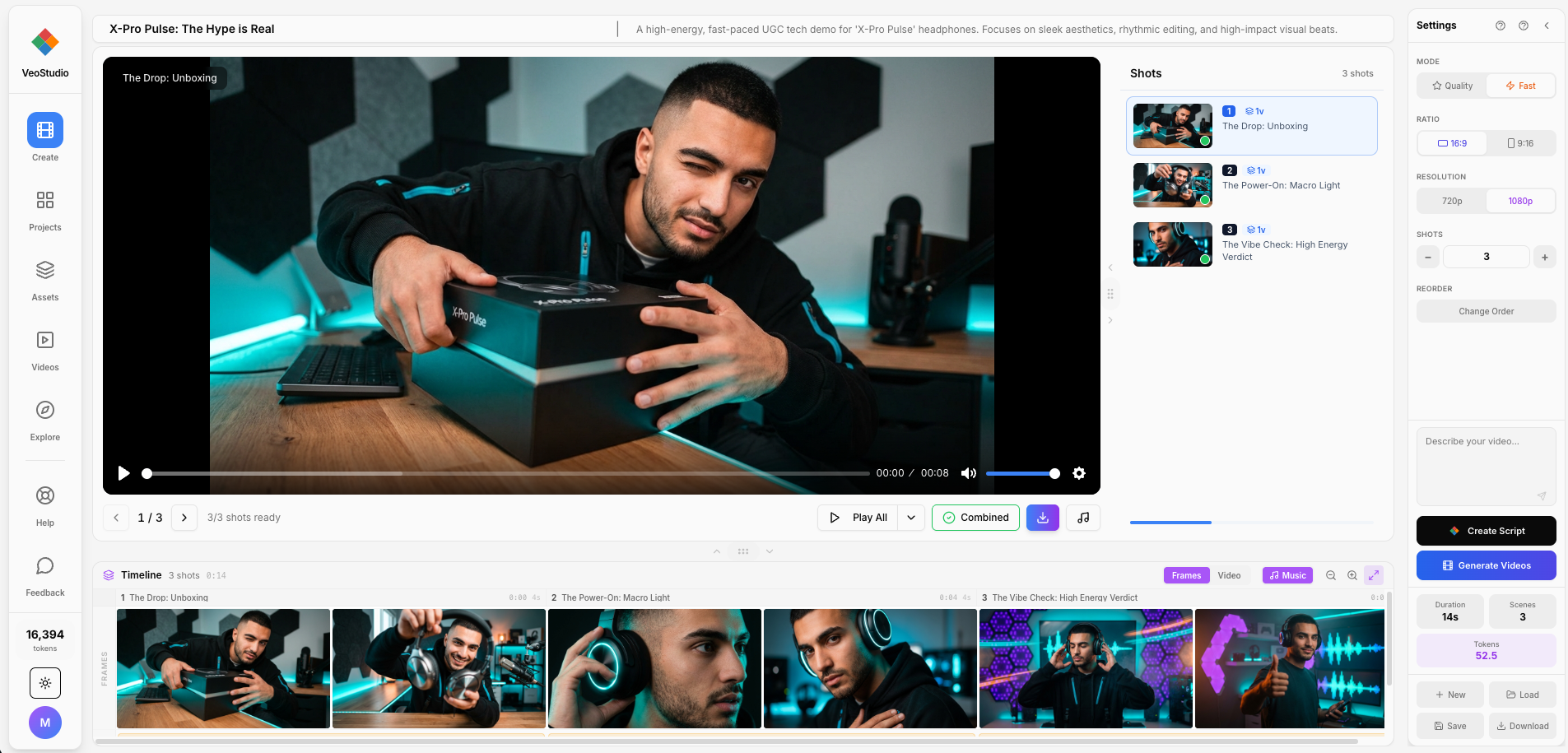
Every shot sits on a timeline with its own settings: video mode (Draft, Fast or Quality), aspect ratio, duration, music. Re-render one shot without touching the other ninety-eight.
Community
Create together.
Share characters, explore the gallery, and build on work other people have already made.
Where it lives
- Gallery
- /gallery
- Characters
- Your library
- Brand kits
- Coming soon
Public gallery
Explore videos made by the community. Get inspired, learn techniques and find the templates that work.
Live nowShared characters
Save characters to a library, reuse them across projects, and share them with the community.
Live nowBrand profiles
Share brand identity kits with a team: colors, fonts, characters and style presets.
Coming soonThe whole inventory
You’ve seen everything. Now build your first film.
The trial opens every one of these features. Video runs 12 tokens a shot in Draft, 30 in Fast, 80 in Quality — and you start with 50.
7-day trial · 50 tokens · no credit card